Adding Fractions Calculator

Use this fraction addition calculator to add two or more fractions, simplify the result, convert to mixed numbers, and view optional steps.
Share
Advertisement

Adding Fractions Calculator

Clear

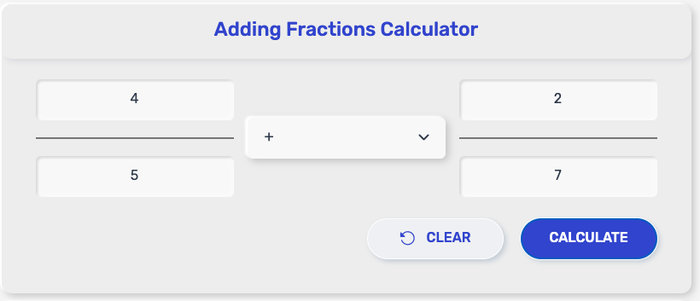
Add fractions fast with this Adding Fractions Calculator. Enter two or more fractions (proper, improper, or mixed), then get a simplified answer as a fraction, mixed number, or decimal. This fraction adder online can also show step-by-step working when you need to double-check.

How to Use the Fraction Addition Calculator

This fraction addition calculator is built for quick inputs and clean results—no extra clutter.

  • Step 1: Type the numerator and denominator for each fraction (for example, 3/8).
  • Step 2: Tap Add another fraction if you want to include a third, fourth, or more fractions.
  • Step 3: Choose your options: keep Simplify on for the lowest-term answer, and turn on Show steps only if you want to see the working.
  • Step 4: Press Calculate to get the total.
  • Step 5: Copy the result, or switch the output format to Fraction, Mixed number, or Decimal depending on what you need.

Adding Fractions Calculator

What This Adding Fractions Calculator Can Do

This Adding Fractions Calculator is made for the situations where you just want the right total—fast—and in the format you actually need.

  • Add 2, 3, or more fractions at once
    Use it like a multi-input fraction adder: enter each fraction on its own line, then calculate a single total.

  • Works with proper, improper, and mixed numbers
    Whether you’re adding 1/4 + 2/3, 7/5 + 3/10, or 1 1/2 + 2/3, this fraction adder online can handle it.

  • Gives a simplified final answer
    The result is reduced to lowest terms by default, so you don’t end up with a fraction that can still be simplified.

  • Switch output formats in one click
    After you calculate, you can view the sum as a standard fraction, a mixed number, or a decimal—handy when different classes or tasks prefer different formats.

  • Keeps results exact in fraction form
    Fraction output stays exact (no rounding). If you choose decimal view, you’ll see an approximate value—especially important for repeating decimals.

  • Optional steps when you want to double-check
    Turn on steps to follow the same logic you’d write by hand, making this fraction addition calculator useful for practice, homework checking, or teaching.

What You’re Seeing After You Calculate

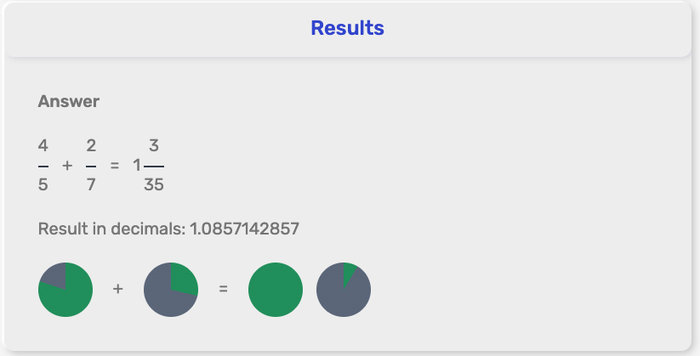
After you hit Calculate, this Adding Fractions Calculator shows your total in a clean, ready-to-use format, plus a couple of alternative views if you want them.

  • Simplified fraction: The main result is reduced to lowest terms, so the numerator and denominator don’t share any common factor.

  • Mixed number (optional): If the sum is an improper fraction, you can display it as a whole number with a remaining fraction (for example, 9/4 → 2 1/4).

  • Decimal (optional): Handy for quick checks or comparisons. Keep in mind some fractions turn into repeating decimals, so the decimal view can be rounded depending on the precision setting.

Your final fraction is the exact sum of every fraction you entered.

Adding Fractions Calculator

Quick Examples (So You Can Sanity-Check Fast)

Here are a few quick totals you can try in the Adding Fractions Calculator to confirm everything looks right:

  • ½ + ⅓ = ⅚

  • ¾ + ⅛ = ⅞

  • 2⁄5 + 1⁄10 = ½

  • 1 ½ + ⅔ = 2 ⅙

  • 7⁄6 + 1⁄3 = 1 ½

  • -⅖ + ⅒ = -3⁄10

If you want to see the working for any of these, turn on Show steps in the fraction adder online before you calculate.

Rounding, Repeating Decimals, and “Exact vs Approx”

This fraction addition calculator gives you two different “types” of answers, depending on how you want to use the result.

  • Fraction output stays exact.
    When you keep the answer as a fraction (especially the simplified one), it’s the precise total—no rounding, no lost value.

  • Decimal output can be approximate.
    Some sums convert neatly (like 1/4 = 0.25), but many don’t. For example, 1/3 = 0.333… repeats forever, so the decimal view has to stop somewhere and show a rounded number.

  • Repeating decimals are normal.
    If your result includes a denominator with factors other than 2 or 5 (like 3, 6, 7, 9, 11…), the decimal often repeats. That’s why a fraction adder is best used in fraction mode when you need an exact value.

  • A practical precision setting:
    A good default is 4 decimal places, with an option to switch anywhere from 2 to 6 digits depending on what you’re doing:

    • 2 digits: quick estimates

    • 4 digits: most school + everyday work

    • 6 digits: tighter accuracy for measurements and calculations

Common Input Issues and Fixes

Even a simple Adding Fractions Calculator can throw an error if one small detail is off. Here are the quick fixes that solve most problems.

  • Denominator is 0 → A fraction can’t have a zero denominator. Change it to any non-zero number (for example, 5/0 isn’t valid, but 5/8 is).

  • Forgot a negative sign → Put the minus sign on the numerator or the whole number part (both work as long as it’s clear), like -3/7 or -1 2/5.

  • Mixed number entered as improper (or the other way around) → If you typed 7/4 but wanted 1 3/4, switch the output to Mixed number (or turn on mixed-number input mode if your tool supports it).

  • Very large numerators/denominators → Big numbers can slow the fraction adder online. If possible, reduce each fraction first (example: 50/100 → 1/2) before running the final addition.

References

  • OpenStax (2020) – Prealgebra 2e: Add and Subtract Fractions with Different Denominators
    https://openstax.org/books/prealgebra-2e/pages/4-5-add-and-subtract-fractions-with-different-denominators

  • OpenStax (2020) – Prealgebra 2e: Add and Subtract Mixed Numbers
    https://openstax.org/books/prealgebra-2e/pages/4-6-add-and-subtract-mixed-numbers

  • Common Core State Standards Initiative (n.d.) – Grade 5 Math (5.NF): Add and subtract fractions with unlike denominators
    https://thecorestandards.org/Math/Content/5/NF/

  • Khan Academy (n.d.) – Adding fractions with unlike denominators (video lesson)
    https://www.khanacademy.org/math/cc-fifth-grade-math/imp-fractions-3/imp-adding-and-subtracting-fractions-with-unlike-denominators/v/adding-small-fractions-with-unlike-denominators

  • Weisstein, E. W. (n.d.) – Fraction (Wolfram MathWorld)
    https://mathworld.wolfram.com/Fraction.html

  • Wolfram|Alpha (n.d.) – Examples: Fractions (exact fraction arithmetic)
    https://www.wolframalpha.com/examples/mathematics/elementary-math/fractions

FAQ

Does the fraction addition calculator simplify the answer automatically?

It can. When “Simplify” is on, the final fraction is reduced to lowest terms.

Can I use it as a fraction adder online for mixed numbers like 1 1/2 + 2 2/3?

Yes. Switch to mixed-number input (whole + fraction) or enter each mixed number as an improper fraction.

What if my fractions already have the same denominator?

Then it’s a quick add: the tool adds the numerators and keeps the denominator, then simplifies if needed.

What if the denominators are different?

The calculator converts them to an equivalent form with a shared denominator, adds the numerators, and simplifies the result.

Can the fraction adder handle negative fractions?

Yes. Put the minus sign on the numerator or the whole part (for mixed numbers), and the tool will add correctly.

Why does the decimal output look rounded?

Some fractions become repeating decimals. Decimal mode may show a rounded value based on the selected precision.


Can I choose the output format (fraction vs mixed number vs decimal)?

Yes. You can switch between simplified fraction, mixed number, and decimal views after calculating.

What happens if I enter 0 as the denominator?

That input isn’t valid. A denominator can’t be zero, so the tool will ask you to correct it.

Why did my inputs change after I hit calculate?

If “Show steps” or “Simplify” is enabled, the tool may display equivalent fractions with a shared denominator so the addition is clear.

Is the result exact?

Fraction output is exact. Decimal output is an approximation when the value doesn’t terminate.

About us

Addingfractionscalculator.com is an easy-to-use online adding fractions calculator created to help students, teachers, and anyone working with fractions quickly and accurately add fractions. By simply entering two or more fractions, the tool instantly calculates the result and presents it in simplified form, saving time and reducing calculation mistakes.


Our mission is to provide straightforward and reliable online math tools that make everyday calculations easier. Many fraction problems can be confusing when done manually, especially when dealing with different denominators. Addingfractionscalculator.com simplifies the process by automatically finding common denominators, performing the addition, and showing the final simplified fraction in seconds.


This Adding Fractions Calculator is designed to work directly in your browser without downloads, sign-ups, or complicated steps. Whether you are solving homework problems, teaching math concepts in class, or quickly checking calculations, the tool provides a fast and convenient solution.


Addingfractionscalculator.com was built and is maintained by a small team of contributors who are passionate about creating practical, accessible, and free educational tools for the web. Our team focuses on developing lightweight one-page calculators that prioritize speed, accuracy, and ease of use.


We continue improving our tools to ensure they remain helpful, reliable, and accessible for students, educators, and everyday users who need quick and accurate fraction calculations online.

Policy

We are committed to maintaining transparency, reliability, and respect for user privacy while providing helpful online tools.


Data and Privacy


The Density Converter does not require account registration and does not collect or store personal data. Any values entered into the converter are used solely to perform the unit conversion and are not saved or shared.


Accuracy Disclaimer


This converter uses standard density conversion formulas widely accepted in scientific and engineering contexts. While we strive to ensure accurate results, the tool is intended for informational and general use purposes only. Users should independently verify results when applying them in professional, academic, or critical environments.


Responsible Use


By using this tool, you acknowledge that the results are automated calculations. The creators and contributors of this tool are not responsible for any decisions or outcomes based solely on the results provided.


Policy Updates


We may update this policy periodically to reflect improvements to the tool or updates to our practices. Any changes will be posted on this page to maintain transparency.